iPhone Duo Turns Yesterday’s Electives into Required Courses
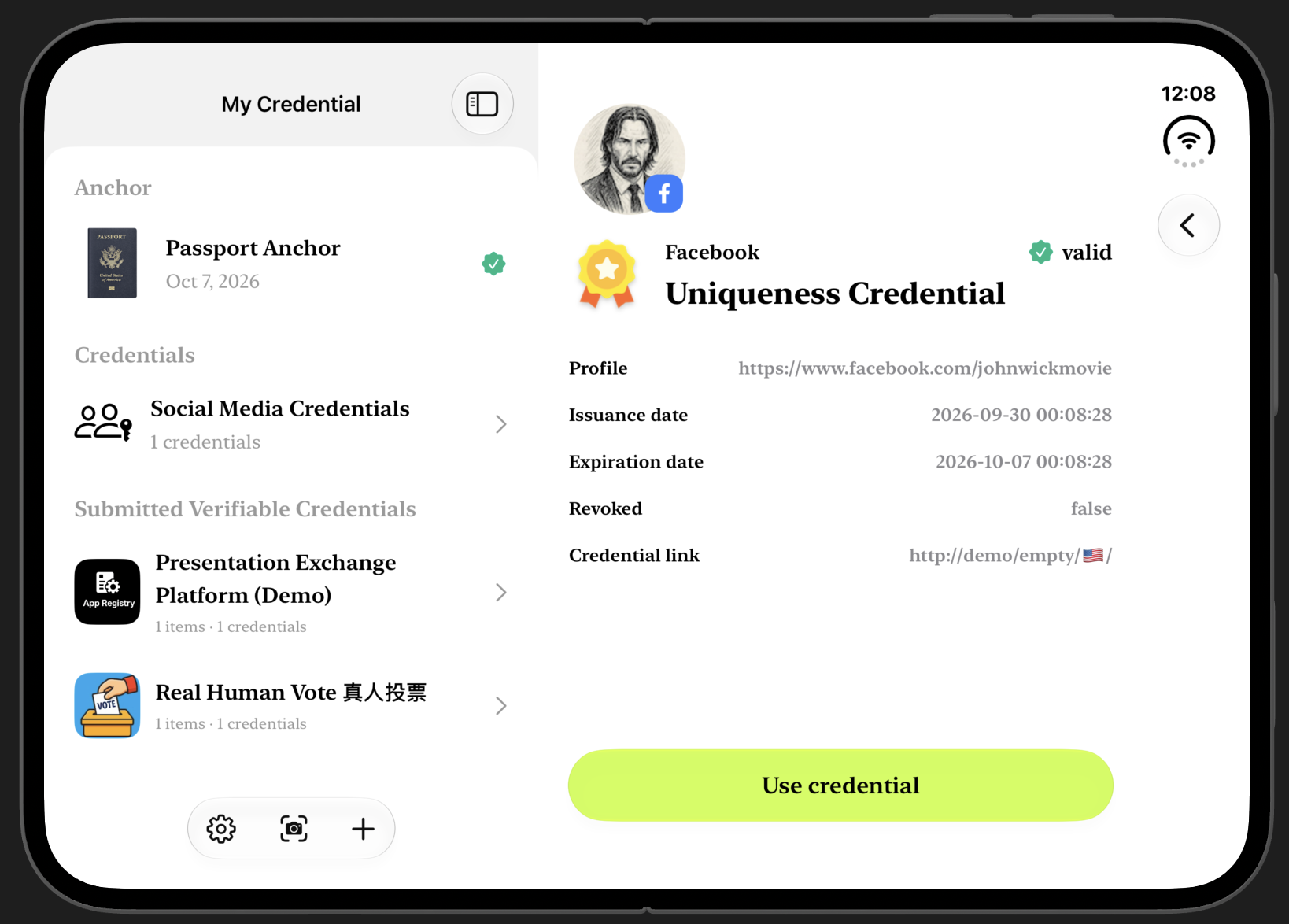
Developing Personhood Credential v4, from adaptive layouts on iPhone Duo and passport scanning tests with Demo Mode to drag and drop between apps. Thoughts on the limits of simulators and being 95% confident.
I’ve been preparing version 4 of Personhood Credential lately, and one of the biggest reasons is the arrival of iPhone Duo.
For developers, Duo is like the arrival of iPhone X nine years ago: we have to start simulating what our apps will look like on it before we have the actual hardware. As usual, Apple kept everything under wraps before the announcement, and the Duo simulator only arrived in Xcode 27.1 beta last week. After putting my app into the Duo simulator, I found that the problems fell into roughly two categories. The first kind is something an engineer can look at and immediately know how to fix. A button ends up underneath the camera for example, so you just adjust the UI.
The second kind isn’t just about “fixing a bug”, it calls for rethinking how the app should be designed. Before Duo, an iPhone was a rectangular screen. Plenty of apps could get away with supporting only Portrait, ignoring sideways use (Landscape), and of course ignoring iPad too. But that doesn’t work with Duo. It has an outer screen, an inner screen, fully unfolded and partially unfolded states, sitting and standing positions, each giving the app a different amount of space. You can restrict the outer screen to Portrait but not the inner screen, which forces developers to take compact / regular size classes seriously—simply put, your app has to know “how much screen space I actually have right now”, then adjust its layout accordingly. This used to be an elective. With Duo, it becomes a required course. Put plainly Apple is taking iPhone off the à la carte menu, leaving only the iPhone + iPad combo meal. Starting with this generation, apps have to handle different screen sizes more thoughtfully. Once that work is done, most apps can check the boxes to become available on iPad and Mac too. Apple is pushing us to build more mature products. So this isn’t just an engineering issue. From this generation onward, product managers will also find it much harder to design an app without considering how people might use it across Apple devices.
A quick detour.
Apple’s developer videos are very thorough, and they include some little details I like.
For example, the time in those videos is always Apr 1 Wed, 9:41. As I remember it, the 9:41 tradition goes back to the early iPhone presentations, when Steve Jobs reached the slide where the product actually appeared, it was roughly 9:41, and Apple kept using that time afterward. As for Apr 1 Wed, I thought Apple was using April Fools’ Day to tell viewers the time was fake, but it actually refers to the date Apple was founded in 1976; another thing I’ve noticed recently is that agents often need some time to finish their work. Apple’s videos don’t make you sit through the wait, instead they put a digital stopwatch in the bottom right corner of the screen, speeding through the actual elapsed time. I’ve run into the same issue when recording my own videos, so I’ve just used jump cuts. If anyone knows how to make a nice “fast-forward stopwatch” like that, or how to keep a Mac’s clock permanently set to Apr 1, 9:41, please leave a comment. I’m quite fond of these pointless(?) little details.
Back to the recent work on Personhood Credential v4. Simulators have their limits. Some APIs aren’t supported, there’s no real camera, and you can’t fully test NFC.
Sounds like I’ll just have to buy a Duo.
But let’s not jump to conclusions, let’s talk about ways around it first. This is actually the same problem I ran into when submitting my app for Apple’s review.
The “Uniqueness Credential” in Personhood Credential is anchored to a passport, which lets a third-party app verify that:
Within a particular context, an action was carried out by one unique real person.
For example one person can claim a subsidy only once, or cast only one vote.
To read passport data securely into an iPhone, you need two things: a camera and NFC. Here’s the problem. Apple’s reviewers won’t, and can’t, go find a passport just to review my app; they also won’t accept a video saying “See, it really works” as a complete way to review it. So the app needs a Demo Mode. The idea is simple: since reviewers don’t have a real passport, I supply fake test data, so they can still go through the whole process. That’s why I made two fake passports: John Wick and Sheldon Cooper. These test passports started as dumps of real passport data, with the contents changed afterward. That lets Apple’s reviewers go through the entire flow.
And while testing Duo this past week: hey, this Demo Mode also gets me around the Duo simulator’s lack of a camera and its NFC testing limitations. Sounds pretty good, but thinking about it more…
Wait, doesn’t “getting around it” mean I still don’t know whether the code that actually reads a passport works properly on Duo?
Well… Maybe I do have to buy a Duo after all?
When deadlines were tight, my former boss from India used to tell me to put a hand on my head, and ask myself: “How confident are you?” Nobody’s asking me these days, so I have to do the head patting and thinking and questioning myself. I haven’t found public information about Duo’s NFC system yet, but I wouldn’t expect it to differ too much from the previous iPhone generation; the John Wick and Sheldon Cooper test data was also created by modifying real passport data while preserving its format. Since the existing code can already scan and read passports correctly, I’d say for now: 95% confident. The remaining 5%, is something we all know very well: Unknown Risk.
One last Duo feature that really interests me: split-screen multitasking. iPad has had this for ages, but Duo is the first iPhone that lets you use two apps side by side. Previously when two apps needed to pass something between them, a universal link was the only way to do it in a single tap. Anything that takes more than one button is something my mom won’t use. But once two apps can sit on the screen at the same time, Drag & Drop suddenly makes sense. It’s like those delightfully wiggling icons on the Home Screen, you instinctively know what to do. Personhood Credential seems well placed to use this, whether dragging in a presentation envelope or dragging out a credential’s presentation submission, both are directions to explore, without constantly jumping back and forth between apps.
So… The simulator can’t fully test NFC. It can’t fully test the camera. And there’s new split-screen and Drag & Drop behavior to explore.
Oh dear. It really does look like I have no choice but to buy a Duo.
It’s all for work.